
While watching a video on TikTok, the favourite button is the third icon in ascending order.

However, most users need help understanding what it stands for, and even if they know, they need to figure out where to look at their favourite TikTok videos.
The favourite videos differ from the liked videos section and might confuse most people.
In this article, I’ll show you how to add a TikTok video to your favourites and how to also look at your favourites on TikTok.
How to Add Videos to Favorite
Adding a video to your favourite with just one tap and removing it the same way is possible.
Also, unlike liked videos, which can be set to be visible to the public, favourite videos are only visible to you.
Here’s how to add a very interesting video to your collection of favourite TikTok videos.
- Open the TikTok app
- While watching a video, you like
- Click on the bookmark icon, usually located beneath the comment box.
- The video will be saved to your favourites immediately.
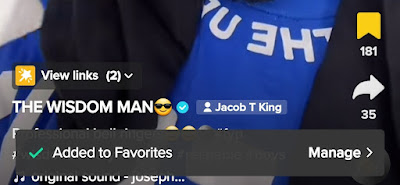
In addition, you can also decide to favourite even hashtags, sounds, effects, places, comments, products, collections, and more on the platform.
Now, that’s all about adding videos on TikTok to your favourites. Let’s see how to view them.
How to Look at Your Favourite TikTok Videos
Remember, you can’t view the favourite videos of other TikTok users; instead, this post shows you how to take a look at yours.
- Open your TikTok app and go to your profile
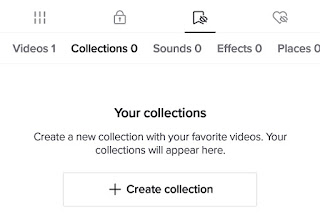
- Flip to the third section with the bookmark icon attached.
- You can now decide to keep them or remove them from the list.
That’s it.
If you want to organize your favourites into different categories, you can create collections by sliding into the collection option and giving them a name.
You can also decide to share your favourite by clicking on the share button attached to the video and choosing the mode of transmission.
That’s it! With these steps, you can easily view and organize your favourite videos on TikTok.
